A mid-mount USB-C receptacle needs a coordinated PCB, connector and enclosure review. Its body occupies a board cutout, so the cutout is part of the mechanical interface rather than unused space. Begin with the manufacturer's controlled drawing and verify the actual board thickness before routing copper around the opening.
The USB-C connector family includes catalog records with drawing references. Those records identify candidates for investigation; the individual drawing must establish whether a particular model is mid-mount and which board construction it expects.
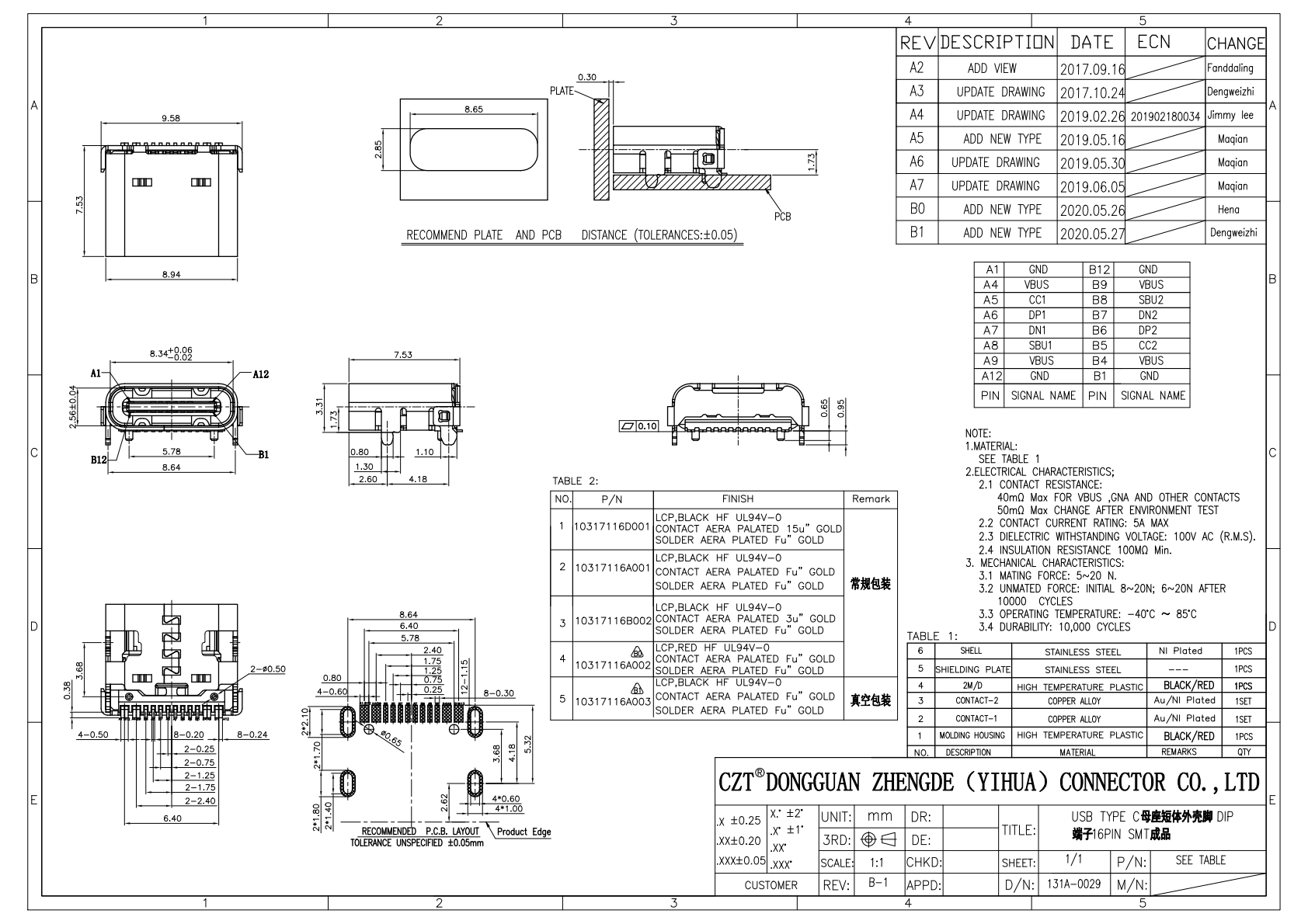
Figure 1. Official CZT Type-C drawing illustrates the need to review the complete seating and footprint geometry before defining board cutouts. CZT source · Original PDF, page 1.
Put every dimension on the same datum
Overlay the connector body, PCB slot and panel opening in one assembly model. Reference all three to named datums. Comparing dimensions taken from unrelated origins can hide a seating problem because each drawing may appear individually correct.
Include the maximum body envelope, board fabrication tolerance and placement tolerance. Check clearance at the slot ends as well as along its straight edges. Corner radii and routing tool access matter when the connector outline approaches the available cutout.
Do not treat nominal alignment as a tolerance analysis. A connector that fits the nominal model may collide with the board edge when several permitted variations accumulate in the same direction.
Review the soldering access
A compact mechanical design still needs a workable assembly process. Inspect whether the stencil can deposit paste on each land and whether neighboring walls restrict printing or inspection. Confirm which shell joints use paste and which require another approved process.
| Interface | Question to resolve | Record for release |
|---|---|---|
| Body to slot | Can the body seat without board interference? | Dimensioned section |
| Tail to pad | Is the intended overlap maintained? | Footprint overlay |
| Shell to board | Are anchors accessible for joining? | Process review |
| Mouth to panel | Can the plug fully engage? | Assembly fit result |
Avoid inventing pad dimensions from a photograph. The correct footprint is the one associated with the approved model and revision, adjusted only through an explicitly reviewed engineering change.
Test the assembly stack
Consider a hypothetical handheld instrument whose mechanical team lowers the PCB to reduce overall thickness. The mid-mount receptacle now appears centered in the side opening, but the enclosure lip overlaps the cable overmold. Moving the opening, changing the board position or choosing another connector height are different remedies with different consequences.
Evaluate the preferred remedy using an actual plug and assembled sample. A loose connector pressed into an unpopulated board cannot demonstrate soldered seating height or cable access after enclosure closure.
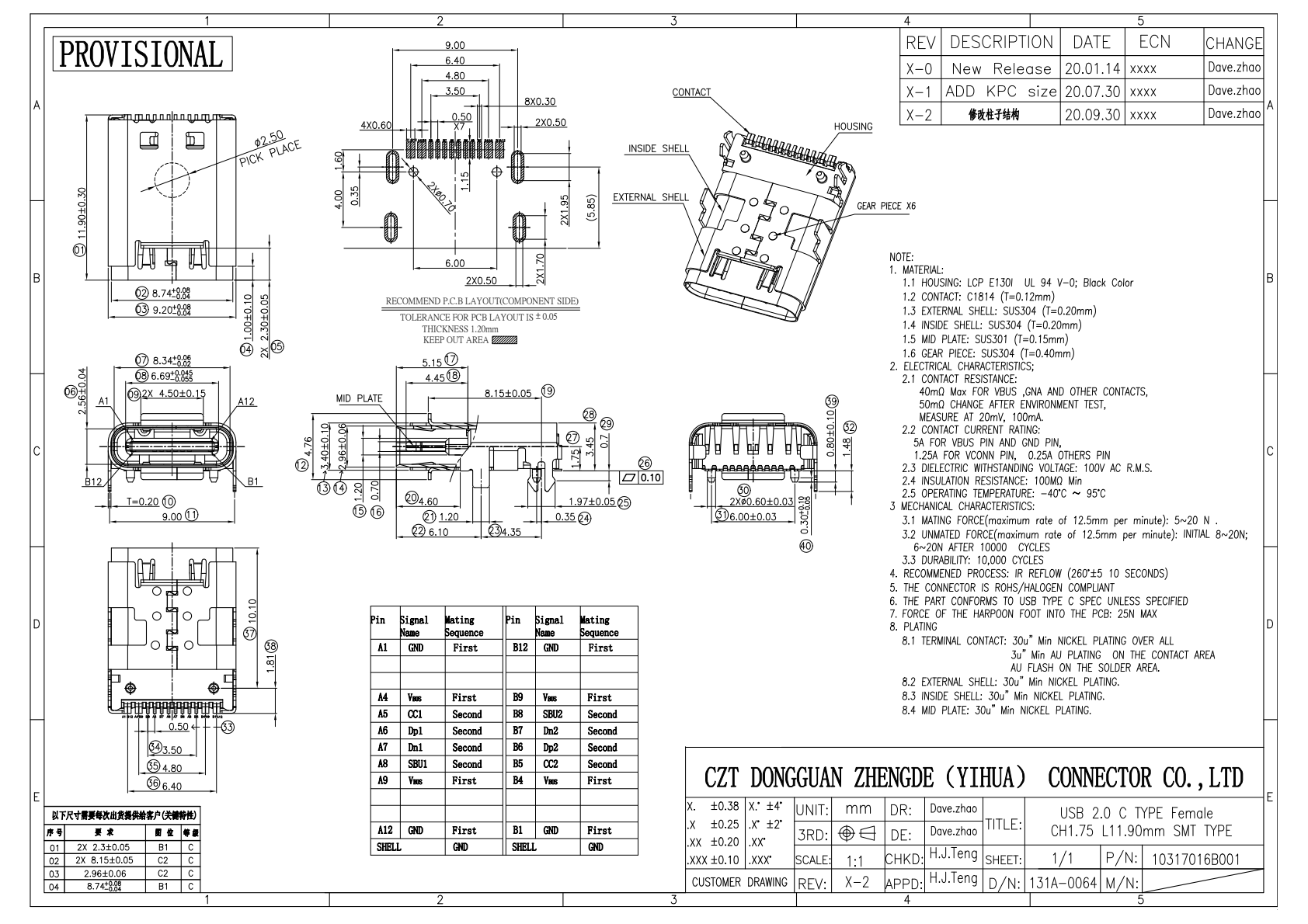
Figure 2. Official CZT board-mounted Type-C drawing provides a contrasting footprint example; a cutout or board-height decision must follow the selected construction. CZT source · Original PDF, page 1.
Inspect the first reflowed articles
Measure seating relative to a defined PCB surface after reflow. Check tilt, shell position and the joints that are accessible to the selected inspection method. Investigate any consistent lifting before accepting it as normal variation.
Keep the board fabrication drawing, connector revision, stencil version and thermal process reference together. The USB-IF connector compliance resources distinguish connector and end-product evaluation; a mechanically successful first article does not establish all USB functions or certification. Release the mechanical fit and assembly findings within their measured scope.
Connect this review to CZT product information
Start with the relevant CZT product family and provide the original interface reference or controlled drawing. Ask which configurations and supporting documents are available for the task described here. Confirm the mating arrangement, required features and project conditions before choosing an orderable part.
Browse the relevant product family · View catalog resources
Discuss a drawing, sample or quotation
Share the part or family reference, current drawing revision, operating conditions and quantities. Include the specific checks described in this article so the inquiry identifies both the component and the evidence needed for your decision. Confirm sample availability and the proposed scope with the supplier.
Request a technical review or quotation
For broader context, read the related selection guide.