Procure single-fiber BiDi optical modules as an identified complementary pair, not as two units selected only by reach or connector shape. The transmit band at one end must correspond to the receive band at the other, within the actual product specifications. Host support and the optical power budget remain separate checks.

Figure 1. CZT BiDi module catalog photo shows the product-pair context for checking exact endpoint ordering codes and complementary transmit/receive specifications. CZT source · Original image.
Define both ends on one record
Create a link-level BOM showing endpoint A and endpoint B. Record the exact module identities and their transmit and receive specifications. Do not rely on a supplier's A/B or U/D suffix without reading its definition; naming conventions need an explicit cross-reference.
Cisco's 10GBASE SFP+ data sheet lists complementary BiDi transmit and receive bands for its own paired products. That is a useful example of the evidence to request, not a wavelength assignment for another manufacturer's module.
Review more than the wavelength pair
Check the intended data rate, host configuration, fiber path and optical limits at both ends. A pair can have complementary bands while still being unsuitable for the intended host or path. Confirm the connector and polish requirements from the actual interface documentation.
CZT's optical product family includes a catalog reference titled 10G SFP+ BIDI Optical Transceiver Module with several reach labels. Treat the title as catalog identity only. Request the exact paired ordering codes and verified specifications instead of selecting a construction from the title alone.
Use a pairing approval checklist
| Item | Required confirmation |
|---|---|
| Endpoint A | Exact code, transmit band and receive band |
| Endpoint B | Exact complementary code and corresponding bands |
| Host | Model, software and permitted port configuration |
| Fiber path | Defined fiber and measured or budgeted loss |
| Marking | Labels that distinguish the two endpoint roles |
| Validation | End-to-end result for the intended pair |
Keep endpoint roles on packaging and assembly instructions. Two separate purchase lines without an installation map can still be placed at the wrong ends of the link.
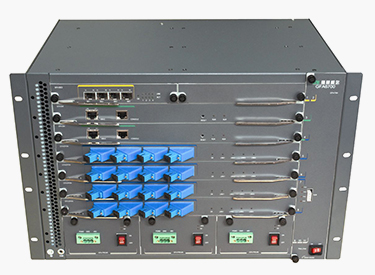
Figure 2. The manufacturer’s optical-equipment application image illustrates multiple endpoint interfaces. Record the exact host and module identities rather than inferring BiDi compatibility from equipment appearance. CZT source · Original image.
Prevent errors during replacement
Maintain the paired identity in spare-parts records. A replacement request should identify which endpoint is being serviced and the module remaining at the other end. Ordering a spare by the damaged module's broad family name can erase the pairing information.
A hypothetical warehouse mistake is shipping two identical endpoint-A modules because both have the requested reach label. A link-level pick list showing one A and one B makes the error detectable before installation.
For spares held at a central warehouse, include the endpoint role on the stock description. A complete ordering code remains necessary, but a readable role label helps catch an otherwise plausible wrong-end replacement during picking.
Release the pair only after the actual host and optical path are reviewed and validated. Preserve the module labels, tested configuration and link results together. That provides a specific replacement basis without making a general compatibility claim for every BiDi module with a similar connector or advertised distance.
Connect this review to CZT product information
Catalog references to discuss are listed below. Use the identifiers to request the current drawing and confirm the configuration required by your application.
| Catalog reference | Product information | Drawing record | Reference inquiry |
|---|---|---|---|
| BiDi SFP+ optical-module catalog record | BiDi SFP+ optical-module catalog record | Request the current drawing | Ask about this reference |
These entries identify catalog families. Their listing does not establish a numerical rating, finished-part tolerance or test approval; obtain that evidence for the requested revision.
Browse the relevant product family · View catalog resources
Discuss a drawing, sample or quotation
Share the part or family reference, current drawing revision, operating conditions and quantities. Include the specific checks described in this article so the inquiry identifies both the component and the evidence needed for your decision. Confirm sample availability and the proposed scope with the supplier.
Request a technical review or quotation
For broader context, read the related selection guide.
